Kitchen Display
Every ticket, one screen, one queue.
Pizza Loop's Kitchen Display shows every ticket, in and out of oven, tracks ticket time by station, and rings when a make-line pizza is stuck. Live tickets from register + online + phone in one queue.
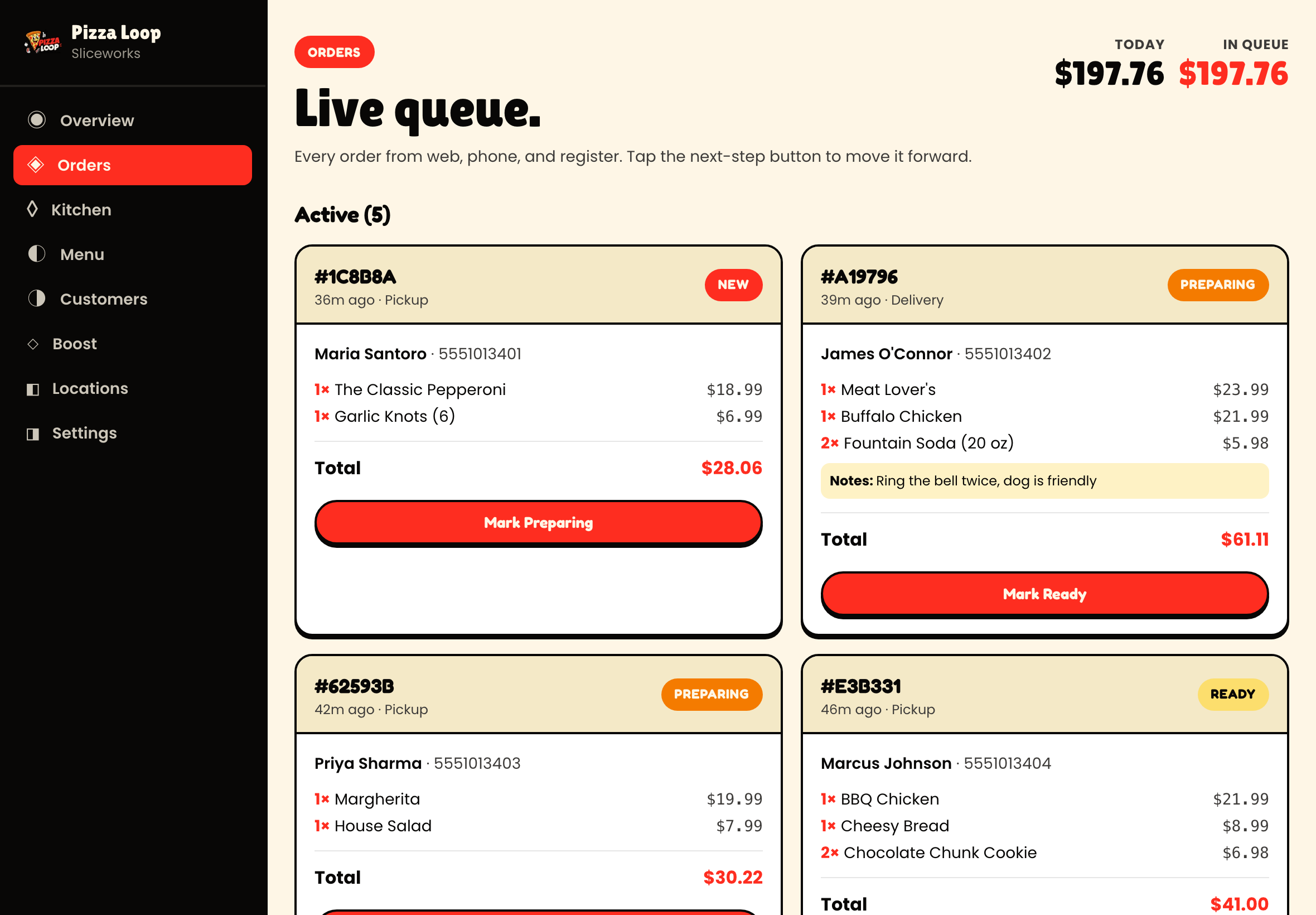
Ticket queue with prep and ready lanes.
Every screenshot on this page is from the live app running against a real demo shop. What you see is what you ship.
The kitchen display problem in pizza shops
Most pizza shops run tickets on paper. A ticket printer rattles off the order, someone slaps it on the make-line rail, the pizza gets made, the ticket gets bumped when it goes in the oven. Old-school, works fine for a small shop.
But when you’re doing 300+ tickets a Friday, paper breaks:
- Tickets get lost, wet, or covered in flour
- Ticket time isn’t measured, so you don’t know when your kitchen is slow
- Online orders and phone orders and in-store orders all print to the same rail without any prioritization
- No visibility into what’s cooking, what’s out, what’s still queued
What Pizza Loop’s KDS does
An iPad mounted at the make-line and another at the pass. Live tickets. Bump when done.
- Live sync with POS + online + phone orders. Every order lands in the same queue in real time.
- Ticket time counter starts the moment the order rings up. When a ticket sits too long, its background turns yellow. Then red.
- Bump-forward flow: “in prep” → “in oven” → “ready for pickup or dispatch”. Each stage has its own timer.
- Station splitting: pizza make-line sees the pizza tickets, wing station sees the wings, salad station sees the salads. Same order, split routing.
- Ready-for-driver signal: hot bag holder rings when a delivery is ready to go.
- Rush-time throttle: when tickets pile up above a threshold, online orders can auto-quote longer prep times or pause delivery to protect quality.
The metrics your ops manager will actually use
Every ticket time gets logged. The dashboard shows:
- Median ticket time per station, per day-part
- 90th percentile ticket time (the slowest 10% of tickets — where you’re losing customers)
- Ticket-time trend week over week
- Ticket-time by menu category (are your specialty pies dragging the queue?)
If your median ticket time hits 25 minutes on Friday nights, the report tells you which stations are creating the drag.
Hardware
- Two iPads at minimum: one at the make-line, one at the pass. Third at the wing station if you have one.
- Mounting arm ($40 from Amazon) or countertop stand.
- iPad chargers keeping them plugged in during service.
Total incremental hardware cost per location: $600-1200 depending on iPad models.
Integrations
Kitchen Display is the source of truth for order state. Online ordering, driver app, customer notifications (“your order is in the oven”), delivery marketplace status updates — all read from KDS. When a ticket gets bumped as “ready”, the customer’s SMS goes out automatically.
What KDS replaces
- Toast KDS ($40-50/mo per screen)
- Square KDS ($60/mo per screen)
- Fresh KDS ($20-40/mo per screen)
- QSR Automations ConnectSmart
- Third-party ticket printers stacking up under the counter
All included in Pizza Loop’s per-location price. No per-screen fees.
See Kitchen Display in action
Book a 20-minute walkthrough. We'll show you exactly how it works for your shop.